My Top Tools for Organization

In the past few years, I have a variety of tools that I’ve used to help me stay organized and on track. It’s been hard to make the switch from paper to digital. But I’ve done it.

GCal

First and foremost these days is Google Calendar. Without Google Calendar, I would probably still be using a paper calendar as my primary form of staying organized. Google Calendar is easy to use and easy to sync to nearly any mobile device. I have Google Calendar synced to my iPhone and iPad. I don’t bother using any other calendar app including Apple’s iCal. If anything were to happen to Google Calendar, I’d probably go back to using a paper calendar. (Although I’d hate it because it wouldn’t be nearly as convenient.)

Todo by Appigo

I also use Appigo’s ToDo on my iPhone as my primary to-do list. It is $4.99 through the App Store, but in my opinion, well worth the price. It is simple, easy to use, and does a variety of things that I need it to do such as repeating tasks on a daily, weekly, biweekly, or monthly basis. I have the option of creating a regular task, a project (for multilevel items), or a checklist (best for grocery lists).

Time Master Billing

Time Master + Billing on the iPhone keeps me on my toes as far as my freelance work goes. I am able to enter different clients, track my time, see how much I’ve made, and back up my progress to Dropbox. I’m sure there’s much more I could do with the app. It’s a hefty $9.99, but with the freelance work I’ve gotten, I’ve made my money back on the app.

QB

Quickbooks Pro on my desktop computer has been invaluable in helping me to invoice clients. (So has PayPal, but I still go back to using Quickbooks.) With Quickbooks, I am able to customize my invoices, balance my checkbooks, generate tax forms, and much more. I primarily use Quickbooks to generate invoices, process payments received, and generally keep track of my finances regarding freelancing. Quickbooks is a huge help come tax time because it can generate various reports for me, such as mileage traveled for work, how much I’ve earned during a tax year, and my expenses during a tax year.

erik-file-cabinet

Finally, IKEA’s Erik filing cabinet has been helpful in organizing all my loose papers. (I’m not a paperless office!) It is sturdy and the drawers roll out smoothly. I have one Erik filing cabinet and am planning to buy another because of how well built it is. It’s $99.00 but a good investment over the cheap-o filing cabinets from Staples (of which I have one).
29 Thought-Provoking Life Questions You Should Constantly Ask Yourself

Andy at My Story to You… posted 30 Thought-Provoking Life Questions You Should Constantly Ask Yourself. (I deleted the last one because it was a repeat of #25.) I don’t know if I’d constantly ask myself these questions, but it’s a good one-shot post. 🙂

1) What great thing would you attempt if you knew you couldn’t fail?

I’d begin an editing business. First, I’d solely take on editing projects by myself to establish a reputation. If more requests came in and I could afford to pay another editor to take on a project, I’d hire someone else. I would like this editing business to grow so that the editing business becomes a network of freelance editors.

2) What would you do if you were 10 times bolder in your relationships, work, family, and spiritual life?

If I were 10 times bolder in relationships including family, I’d be completely honest about my struggles. In work, I would do things and risk suffering the consequences of my actions later. In my spiritual life, I’d believe in God boldly and His ability to do amazing things in my life and the lives of those I know.

3) What would you be doing if you had all the money in the world?

Honestly? Spending it on myself selfishly lol. I’d get voice lessons for fun. I’d spend some on missionaries and charitable organizations my husband and I support. I’d also put it toward my editing business to make that dream come true sooner that I hoped! I’d buy things for friends and be less stingy with gift-giving.

4) If you could teach something, what would you want to teach?

English or History.

5) If you left this life tomorrow, what message would you leave behind for the next seven generations?

Meaningless, meaningless, everything is meaningless. So fear God, eat, drink, and be merry! Continue reading “29 Thought-Provoking Life Questions You Should Constantly Ask Yourself”

iPhone/iPad/iTouch Productivity: Lists & Tasks App Mania

I’m an organizational/planning freak. As a result, I’m CRAZY about lists.

  • If there’s something to do, it goes on a list.
  • If there’s something I want to purchase, it goes on a list.
  • If there’s a book I want to read, there’s a list for that too. (Goodreads is fantastic, btw.)

I have grocery lists, travel lists, and wish lists. I am your List Maven Du Jour.

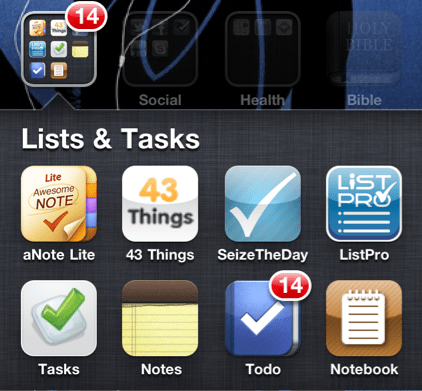
I received an iPhone for Christmas, and as a result, have been exploring the to-do list apps in Apple’s App Store. At one point, I downloaded about six (free) apps all at one time just so I could try out their features. (Note: An app that was free has since begun charging since I downloaded it.) A few of them were free “lite” apps meaning that they had limited features for you to try out before plunking down the cash to use the full version. I really appreciated this since I’m judicious about paying even $.99 for an app unless I know it’ll be good. I don’t download apps that cost money unless I’ve tried them for free first or their ratings are so spectacular that the app is likely to be good. (App Store users: PLEASE pay attention to ratings and reviews. They are your friend. They will spare you from forking over $1.99 for a prank app that looks real.)

So, I’ve made a list of pros and cons for each of my six apps. Some things I’ve listed as cons might be pros for you. This is not a comprehensive list of To-do/Task apps but simply the ones that I tried. I purposely avoided the super-popular ones like Remember the Milk and Toodledo (because they cost money). Hopefully you’ll find one that works for you.

[Update as of 1/30/2011: the basic Remember the Milk app is free for Apple mobile devices.]

Continue reading “iPhone/iPad/iTouch Productivity: Lists & Tasks App Mania”