My Top Tools for Organization

In the past few years, I have a variety of tools that I’ve used to help me stay organized and on track. It’s been hard to make the switch from paper to digital. But I’ve done it.

GCal

First and foremost these days is Google Calendar. Without Google Calendar, I would probably still be using a paper calendar as my primary form of staying organized. Google Calendar is easy to use and easy to sync to nearly any mobile device. I have Google Calendar synced to my iPhone and iPad. I don’t bother using any other calendar app including Apple’s iCal. If anything were to happen to Google Calendar, I’d probably go back to using a paper calendar. (Although I’d hate it because it wouldn’t be nearly as convenient.)

Todo by Appigo

I also use Appigo’s ToDo on my iPhone as my primary to-do list. It is $4.99 through the App Store, but in my opinion, well worth the price. It is simple, easy to use, and does a variety of things that I need it to do such as repeating tasks on a daily, weekly, biweekly, or monthly basis. I have the option of creating a regular task, a project (for multilevel items), or a checklist (best for grocery lists).

Time Master Billing

Time Master + Billing on the iPhone keeps me on my toes as far as my freelance work goes. I am able to enter different clients, track my time, see how much I’ve made, and back up my progress to Dropbox. I’m sure there’s much more I could do with the app. It’s a hefty $9.99, but with the freelance work I’ve gotten, I’ve made my money back on the app.

QB

Quickbooks Pro on my desktop computer has been invaluable in helping me to invoice clients. (So has PayPal, but I still go back to using Quickbooks.) With Quickbooks, I am able to customize my invoices, balance my checkbooks, generate tax forms, and much more. I primarily use Quickbooks to generate invoices, process payments received, and generally keep track of my finances regarding freelancing. Quickbooks is a huge help come tax time because it can generate various reports for me, such as mileage traveled for work, how much I’ve earned during a tax year, and my expenses during a tax year.

erik-file-cabinet

Finally, IKEA’s Erik filing cabinet has been helpful in organizing all my loose papers. (I’m not a paperless office!) It is sturdy and the drawers roll out smoothly. I have one Erik filing cabinet and am planning to buy another because of how well built it is. It’s $99.00 but a good investment over the cheap-o filing cabinets from Staples (of which I have one).
Overcoming Writer’s Block: 300 Words a Day

Reading Anne Lamott makes me want to write. Is that the mark of a good writer? One who encourages other writers to write?

I am reading Bird by Bird, her book on writing and life. To overcome writer’s block, she encourages her readers (who are writers) to write 300 words a day.

Three hundred words a day. I can do that. Right?

I have a memory book that I’m writing. In it all are the memories that I can possibly remember. Believe it or not, I don’t remember much. Only about 20 pages’ worth of memories in a small journal out of who knows how many pages possible. 200? Although I have 20 years of journals to sort through and read to remind myself of all the horrible things that have happened to me. Because, of course, I am notorious for recording the negative events in my life rather than the positive ones.

Perhaps the following really belongs on my depression introspection blog, but I’ve had a really great year. Since my father died 11 years ago, 2012 has been the best year I’ve had mentally. Physically, I’m still dealing with chronic mono, but I hope that 2013 will bring a year of renewed mindfulness and energy. Normally, the fall and winter months (especially the Christmas season) bring with it sadness and depression, but thank the LORD, it’s been at bay this year. I’m finally accepting my father’s death and doing my best to move forward. I’ve accepted the fact that another year has gone by that I’m not a mother, and that’s okay. Forward. It was President Obama’s slogan during his re-election campaign, but it holds so much meaning for me. I will not let a political campaign co-opt a word that describes how I need to look toward the future.

I am trying to read a Bible chapter daily and pray daily. I am using Health Month to do this. I still have not succeeded in exercising. I do not know that I will ever succeed in exercising. I start then stop, in fits, like traffic on the congested Belt Parkway. I do not know that I have grown closer to God. But I am walking by faith and not by sight (2 Corinthians 5:7). I am reading about the Old Testament God—the Heavenly Father who was all wrath and anger and appeasement by animal sacrifice. I like the New Testament God—Jesus, the Incarnation, who is all love and human and emotional. Reading about God through Genesis makes me so glad for Jesus in the four Gospels.

“Whose god then is God? They all want jurisdiction. In the Book of Earth, whose god spread fear? Spread love?” —Tori Amos

I fear that my Mac is not long for this world. It is one of the discontinued 13″ white Macbooks (I almost wrote Powerbook—whew!). I don’t use it for anything anymore except to play music and to sync my iPhone to.  It was playing music when the song came upon a discordant note and the note kept playing over and over and over and… well, you get the point. It was like a CD permanently skipping. I had to force restart my Mac by holding down the Power button. But unlike the devotees of Mac, I simply cannot afford to buy a new Mac laptop of any sort. It is much too much expensive. But then again, I haven’t been sucked into the cult of Mac when it comes to computers. If I really loved Macs, I’d spend the money. But I don’t. I’d rather plunk down the cash and get a touchscreen Windows laptop for maybe as much money (or a fraction of the cost—I’m not sure how much touchscreen laptops run these days).

I am definitely an “i” girl. I use iTunes, love my iPhone, own an iPod Shuffle and and iPod Touch, and would like an iPad. Apple has won me over in the mobile department. But I figure I can make things work on Windows if need be. I would plunk down the money for an iPad. I just haven’t yet.

Look at that. More than 700 words. And the goal was simply to write 300. Can I keep this up? I need to whether it’s through blogging, article writing, or fiction creation. I won’t get better as a writer otherwise.

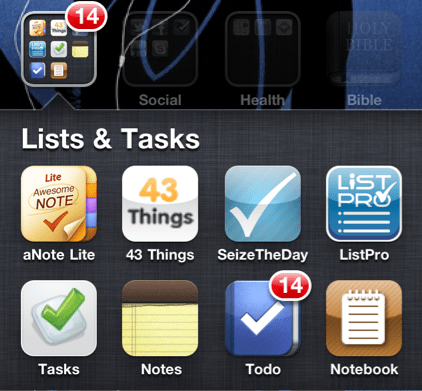
iPhone/iPad/iTouch Productivity: Lists & Tasks App Mania

I’m an organizational/planning freak. As a result, I’m CRAZY about lists.

  • If there’s something to do, it goes on a list.
  • If there’s something I want to purchase, it goes on a list.
  • If there’s a book I want to read, there’s a list for that too. (Goodreads is fantastic, btw.)

I have grocery lists, travel lists, and wish lists. I am your List Maven Du Jour.

I received an iPhone for Christmas, and as a result, have been exploring the to-do list apps in Apple’s App Store. At one point, I downloaded about six (free) apps all at one time just so I could try out their features. (Note: An app that was free has since begun charging since I downloaded it.) A few of them were free “lite” apps meaning that they had limited features for you to try out before plunking down the cash to use the full version. I really appreciated this since I’m judicious about paying even $.99 for an app unless I know it’ll be good. I don’t download apps that cost money unless I’ve tried them for free first or their ratings are so spectacular that the app is likely to be good. (App Store users: PLEASE pay attention to ratings and reviews. They are your friend. They will spare you from forking over $1.99 for a prank app that looks real.)

So, I’ve made a list of pros and cons for each of my six apps. Some things I’ve listed as cons might be pros for you. This is not a comprehensive list of To-do/Task apps but simply the ones that I tried. I purposely avoided the super-popular ones like Remember the Milk and Toodledo (because they cost money). Hopefully you’ll find one that works for you.

[Update as of 1/30/2011: the basic Remember the Milk app is free for Apple mobile devices.]

Continue reading “iPhone/iPad/iTouch Productivity: Lists & Tasks App Mania”